Accounting for E-commerce: Managing Inventory and High-Volume Transactions
Your spreadsheet broke at 50 orders per day. Here is what to do about it.
The E-commerce Accounting Problem
You launched an online store. Sales are growing. That is the goal, right?
Then one month, you realize your accounting setup is not keeping up. The spreadsheet that worked fine when you processed 10 orders per day now takes hours to update. You do not know which products are actually profitable after factoring in all the costs. Month-end close takes two weeks, and by the time you have numbers, they are already outdated.
This is the pattern for most e-commerce businesses: accounting becomes the bottleneck right when growth demands better financial visibility.
The problem is not just transaction volume. It is the combination of high volume plus inventory complexity plus multi-channel sales plus payment processor delays plus returns. Traditional accounting systems were not built for this.
That is why e-commerce accounting is different. It requires a fundamentally new approach.
Why E-commerce Accounting is Different
E-commerce businesses operate at a fundamentally different scale and complexity than traditional retail or service businesses.
Transaction volume is the first obvious difference. A traditional retail store might process 20-50 transactions per day. An e-commerce business doing the same revenue could be handling 200-500 transactions daily, with far smaller average order values. Every transaction needs to be recorded, categorized, and reconciled.
Multi-channel complexity is the second layer. You are not just selling through your own website. You have Instagram Shop, TikTok Shop, marketplace platforms, maybe a physical pop-up. Each channel has its own payment flow, fee structure, and settlement timing. Your accounting system needs to track revenue by channel while consolidating everything for financial reporting.
Inventory movement adds the third dimension. Unlike a service business with no inventory or a retailer with a single location, e-commerce inventory is constantly moving: from suppliers to your warehouse, from warehouse to fulfillment centers, from fulfillment to customers, and back when returns happen. You need real-time visibility into what you own, where it is, and what it cost you.
Payment processor delays create timing mismatches. A customer pays on Monday, but Stripe does not settle to your bank account until Wednesday. Do you recognize revenue on Monday (accrual basis) or Wednesday (cash basis)? What about the 2.9% + $0.30 fee — is that a cost of goods sold or an operating expense?
Returns and refunds are the final complexity. In traditional retail, returns are exceptions. In e-commerce, 10-30% return rates are normal for some categories. Every return affects your revenue, your inventory valuation, and your cost of goods sold. If your accounting setup treats refunds as "negative revenue" instead of properly reversing the original transaction, your financial statements will be wrong.
That is the complexity e-commerce businesses face. It is not just more transactions; it is a fundamentally different business model.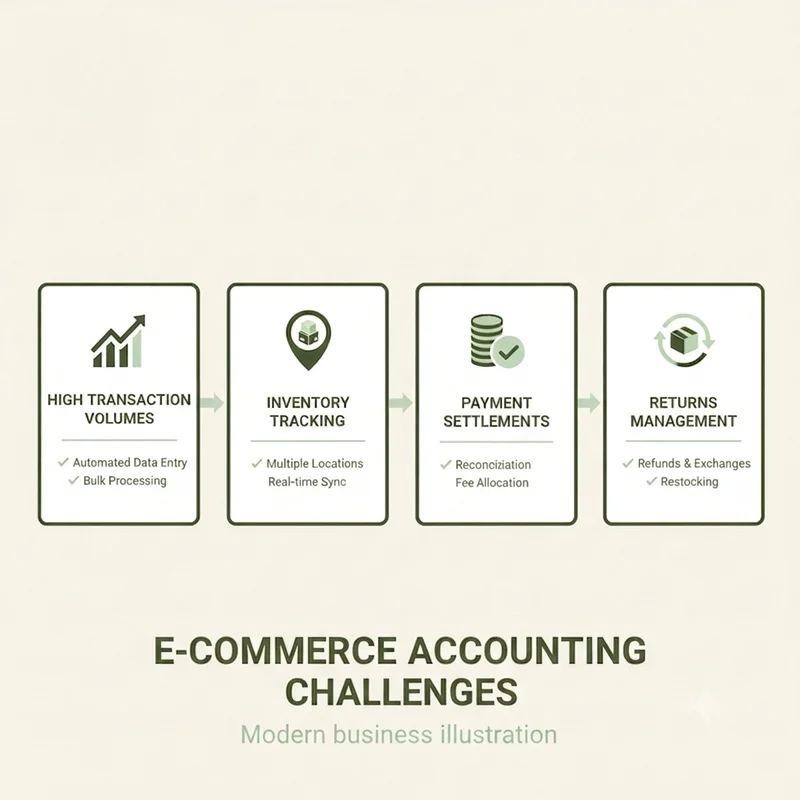
The Three Core Accounting Challenges
Challenge 1: Tracking Inventory Accurately
Manual inventory tracking breaks the moment you scale beyond 20-30 SKUs.
You need SKU-level tracking for accurate cost of goods sold. If you sell t-shirts in 5 sizes and 4 colors, that is 20 SKUs, each with potentially different costs depending on when you bought them. Without SKU-level tracking, you cannot calculate true product profitability.
The FIFO vs weighted average decision matters more in e-commerce than in traditional retail because of how fast inventory turns. FIFO (first-in, first-out) assumes you sell your oldest inventory first. Weighted average blends all your inventory costs together. In inflationary environments or when you source from multiple suppliers at different prices, the method you choose can swing your profitability by 5-10%.
Multi-location inventory is standard in e-commerce. You might have stock in your warehouse, stock at a third-party fulfillment center, consignment inventory with influencers, and goods in transit from suppliers. Your accounting system needs to track all of it and value it correctly.
Shrinkage, damage, and returns are operational realities. Products get damaged in fulfillment. Customers return items that cannot be resold. Inventory goes missing. If you do not have a systematic way to write off this inventory and adjust your COGS, your books will show phantom profit that does not exist.
That is the challenge with inventory: it is not just about counting stock. It is about understanding the true cost and value of your inventory at every moment.
Challenge 2: Managing High Transaction Volumes
Daily reconciliation becomes impossible manually once you exceed 50 transactions per day.
The math is simple: if each transaction takes 2 minutes to record and categorize, 100 transactions per day means 200 minutes (over 3 hours) of data entry daily. No small business has that time. The work piles up, you fall behind, and by month-end you are scrambling to reconstruct what happened weeks ago.
Payment gateway fees get buried in net settlements. Stripe charges 2.9% + $0.30 per transaction but only deposits the net amount to your bank. If you only record the deposit, you are understating both your revenue and your expenses. Your profit margin looks better than it actually is.
Currency conversions add another layer if you sell internationally. You price in USD but settle in AED or SAR. Do you book the revenue at the transaction exchange rate or the settlement rate? The difference can be material for businesses with significant cross-border sales.
Bulk transaction import and categorization is not a nice-to-have feature. It is operational necessity. Your accounting software needs to pull transactions directly from your sales platforms and payment processors, apply categorization rules automatically, and flag exceptions for manual review. Without this, you drown in data entry.
Month-end close taking weeks instead of days is the clearest signal that your accounting setup is broken. If you cannot close your books and see accurate financials within 5 business days of month-end, you do not have accounting — you have historical data reconstruction.
That is the reality of high transaction volumes: without automation, you are buried in data entry and reconciliation.
Challenge 3: Revenue Recognition and Fulfillment
When do you recognize revenue: at order or at shipment?
The answer matters for financial reporting accuracy. Accrual accounting says you recognize revenue when you earn it (when you ship the product), not when you receive payment. But many e-commerce businesses on simplified accounting treat the order date as the revenue date, which works fine until you start having significant order-to-ship delays or high cancellation rates.
Prepaid orders vs fulfilled orders creates a liability on your balance sheet. If a customer pays today for a product you will ship next month, that is not revenue yet — it is deferred revenue (a liability). When you ship, you convert that liability to revenue. Most small e-commerce businesses ignore this, which makes their revenue lumpy and their balance sheet inaccurate.
Subscription revenue for recurring product businesses (monthly boxes, replenishment services) requires even more careful treatment. You cannot recognize 12 months of revenue upfront when a customer subscribes. You recognize it monthly as you fulfill each shipment.
Gift cards and store credit are liabilities, not revenue. When someone buys a gift card, you received cash but have not earned revenue yet. You only recognize revenue when the gift card is redeemed. If you book gift card sales as immediate revenue, you are overstating your income.
Refund accounting should reverse the original transaction, not create a separate negative revenue entry. If you sold a product for $100 and later refunded it, your accounting should show zero net revenue for that transaction, not $100 revenue and a $100 refund expense. The distinction matters for gross margin analysis and product profitability.
That is the complexity of revenue recognition: it is not just about when you get paid. It is about when you have truly earned the revenue.
Setting Up E-commerce Accounting the Right Way
Chart of Accounts for E-commerce
Your chart of accounts needs to reflect how e-commerce actually works.
Revenue accounts should break down by channel: Shopify revenue, Instagram Shop revenue, Marketplace revenue. This lets you analyze which channels are actually profitable after factoring in their different fee structures and customer acquisition costs.
COGS accounts should tie to product categories, not be one giant "Cost of Goods Sold" bucket. If you sell apparel and electronics, those are separate COGS accounts because they have wildly different margins and inventory characteristics.
Expense accounts need granularity around e-commerce operations:
- Fulfillment and packaging
- Shipping costs (separate from what you charge customers)
- Payment processing fees
- Platform fees (Shopify subscription, marketplace commissions)
- Returns processing
Asset accounts include inventory (by location if you have multiple), prepaid shipping credits with carriers, and prepaid platform fees.
Liability accounts cover customer deposits, gift card liabilities, sales tax payable, and VAT payable (critical for GCC businesses).
That is the foundation: a chart of accounts that reflects the true complexity of your business.
Integration is Not Optional
Manual data entry is guaranteed to break at e-commerce scale.
Your accounting software must integrate with:
- Sales platforms: Shopify, WooCommerce, Salla, Zid (for GCC markets)
- Payment gateways: Stripe, PayPal, Checkout.com, Tap Payments
- Inventory management systems if you use one separate from your sales platform
- Shipping providers for accurate cost tracking
The integration can be real-time sync (transactions flow to accounting instantly) or nightly batch import (transactions are consolidated at end of day). Real-time gives you better visibility but can create reconciliation complexity if transactions later get modified. Nightly batch is more stable but means your books are always one day behind.
Choose based on your operational needs. If you make daily decisions based on financial data, real-time matters. If you only review finances weekly or monthly, batch import is fine.
That is the reality: without integration, you are stuck in manual mode forever.
Automating Transaction Recording
The goal is to minimize manual data entry to near zero.
Bulk transaction import from payment processors should happen automatically. Your accounting software pulls all transactions, applies categorization rules, and posts them to the right accounts.
Automatic categorization rules learn from your past data. Stripe fees always go to "Payment Processing Expense." Shopify Shipping revenue always goes to "Shipping Income." Customer refunds trigger a refund workflow that reverses the original transaction.
Reconciliation workflows should be built in. The software flags transactions that do not match expected patterns: unusually large orders, duplicate transactions, mismatched amounts between your sales platform and payment gateway.
Exception handling for failed payments, chargebacks, and disputes needs systematic accounting treatment. A chargeback is not just a refund — it is a refund plus a chargeback fee, and it might need to be recorded as bad debt expense if you cannot recover the goods.
That is the goal: automate everything that can be automated, and handle exceptions systematically.
GCC-Specific E-commerce Accounting Considerations
VAT on e-commerce follows different rules for B2C vs B2B sales, and local vs cross-border transactions. Selling a product to a consumer in Saudi Arabia from your UAE warehouse? That might be zero-rated for UAE VAT but subject to Saudi import VAT. Your accounting system needs to handle this automatically based on customer location and product category.
E-invoicing compliance is mandatory for Saudi e-commerce businesses under ZATCA Phase 2. Every invoice must be issued through a ZATCA-compliant system with specific data fields and formats. UAE e-invoicing is rolling out and will have similar requirements. Your accounting software must generate compliant e-invoices automatically, not as an afterthought.
Multi-currency accounting is standard for GCC e-commerce. You might price in USD for customer familiarity but settle in AED or SAR. Your accounting system needs to handle the currency conversion automatically and track foreign exchange gains/losses.
Free zone vs mainland tax treatment in the UAE affects how you account for corporate tax. Free zone businesses have different rules. Your accounting setup needs to be configured correctly from day one because fixing it retroactively is painful.
Arabic invoicing requirements mean your customer-facing invoices must be in Arabic (or bilingual), while your internal financial reports can be in English. This is a UX requirement, not just a translation task. Your accounting system needs to handle Arabic-first interfaces natively, not through clunky workarounds.
That is the GCC reality: compliance is not optional, and your system needs to handle it natively.
What Good E-commerce Accounting Looks Like
Here is the checklist. If you can check all of these, your accounting setup is scaling with your business:
[ ] Daily automated transaction sync from all sales platforms
[ ] Real-time inventory valuation at SKU level
[ ] Month-end close completed in under 5 days
[ ] COGS accuracy within 2% of physical inventory counts
[ ] Payment processor fees correctly allocated as operating expenses
[ ] VAT/tax compliance fully automated with no manual calculations
[ ] Refund accounting that reverses original transactions systematically
[ ] Management dashboard showing profitability by product and channel in real time
If you are manually copying transactions from Shopify to Excel, you are not there yet. If month-end close takes 15 days, you are not there yet. If you cannot answer "What is my best-selling product margin?" in under 60 seconds, you are not there yet.
That is the benchmark: if you are not there yet, you have work to do.
When to Move Beyond Spreadsheets
Concrete signals that your current setup is breaking:
Processing 50+ orders per day. This is the inflection point where manual data entry becomes a full-time job. If you are spending more than an hour per day on transaction recording, you need automation.
Selling across 2+ channels. The moment you add a second sales channel (Instagram Shop, marketplace), reconciliation complexity doubles. Spreadsheets cannot handle this without error-prone manual consolidation.
Inventory SKU count exceeds 50. Manual inventory tracking works for 10-20 SKUs. Beyond 50, you lose visibility into what you actually own and what it costs you.
Month-end close takes more than 10 days. If you cannot close books and produce financial statements within 10 business days of month-end, your accounting process is broken. Investors and lenders expect 5-7 day close cycles.
Cannot answer product profitability questions instantly. If someone asks "What is our gross margin on Product X?" and you need to pull data from three different spreadsheets to answer, you do not have accounting — you have data archaeology.
VAT filing requires manual spreadsheet calculations. Every time you file VAT, you are rebuilding the numbers from scratch. This is a massive risk for compliance errors and a waste of time.
That is the breaking point: when you see these signals, it is time to change.
What to Do This Week
Practical steps to improve your e-commerce accounting starting today:
Audit your current setup. Write down every manual step in your accounting process. Where are you copying data? Where are you doing calculations by hand? These are your automation opportunities.
List your sales channels and payment processors. Map out the full data flow: where transactions originate, how they get to your bank, what fees are charged at each step.
Check integration capabilities. Does your accounting software integrate with your sales platforms? If not, you are stuck with manual data entry forever.
Evaluate e-commerce-native platforms. Not all accounting software is built for e-commerce. Look for platforms designed for high-volume transactions, inventory tracking, and multi-channel sales.
Set up automated daily transaction imports. Even if you cannot fully automate everything, getting transactions into your accounting system daily (instead of monthly) is a huge improvement.
Implement SKU-level inventory tracking. Start tracking inventory at the SKU level. This might mean changing how you code products in your sales platform, but it is essential for accurate COGS.
The goal is not perfection on day one. The goal is systematic improvement: reduce manual work, increase accuracy, speed up your close cycle, and get better financial visibility to make smarter decisions.
See how Bizrah handles e-commerce accounting with automated transaction imports, SKU-level inventory tracking, and GCC-native compliance built in → Try Bizrah Free